Time Series Charts: From Default to Intentional

Time series data sits at the heart of most business presentations. Whether the data is annual, quarterly, monthly, or daily, business development and marketing professionals are routinely asked to turn it into visualizations that not only inform, but provide direction to management.

Working with time series data is harder than it looks. Even before you reach the chart, the data itself can fight you—years, months, and quarters often live in separate columns and need to be assembled into a proper date. And once you have correctly formatted dates, a new question appears: how much of each date does the reader actually need to see?

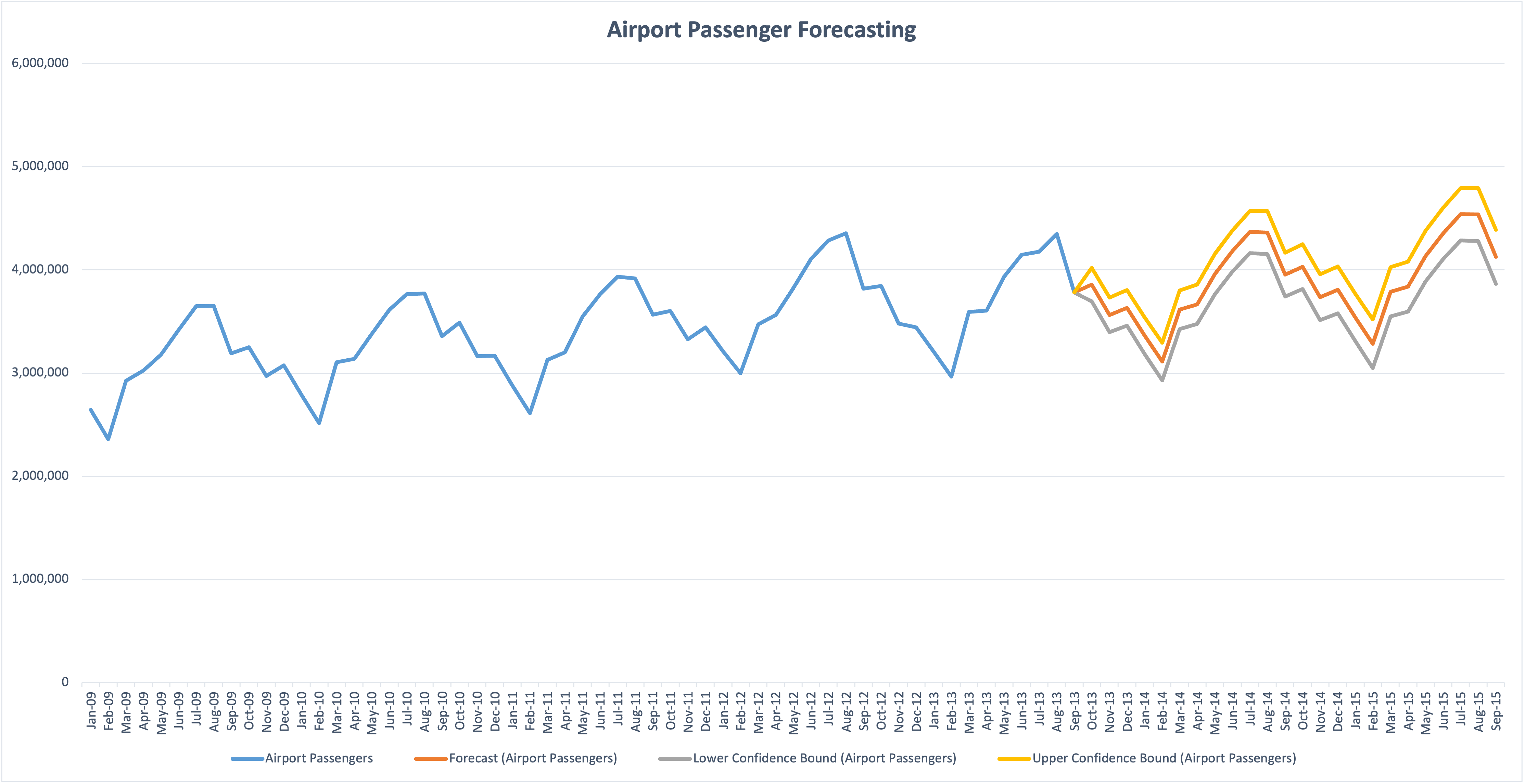
Consider the following chart, which shows monthly data over a six-and-a-half year period.

Line chart of monthly airport passenger counts from January 2009 to September 2015, showing seasonal peaks and troughs. The x-axis displays every single month label (Jan-09, Feb-09, Mar-09, and so on), creating dense, rotated text that runs the full width of the chart. A legend at the bottom lists four series: Airport Passengers, Forecast, Lower Confidence Bound, and Upper Confidence Bound.

(Data from https://support.microsoft.com/en-us/office/create-a-forecast-in-excel-for-windows-22c500da-6da7-45e5-bfdc-60a7062329fd)

The instinct to show every date because it exists in the data produces two consequences that hurt comprehension: rotated labels that are hard to read, and a cluttered x-axis that slows the eye as it tries to track values over time. The result is visual noise that obscures the story the chart should be telling. People tend to dump their data into charts without thinking visually first.

Excel’s default labeling patterns reinforce the problem—they look rigid, and most users don’t realize they can intelligently control which dates appear or use strategic spacing to produce a cleaner visualization.

A few principles for time series charts

Before walking through the alternatives, here are the guidelines I want each chart to satisfy:

  • The x-axis should display only as many dates as the reader needs to anchor the trend.
  • Labels should be horizontal whenever possible.
  • The y-axis range should reveal variation in the data, not enforce a zero baseline by default.
  • The title should do analytical work—telling the reader what to take away, not just what the chart contains.
  • Legends should be minimized; encode information in the title or directly on the chart when possible.

Quick improvements in Excel

With tools like Plotnine and ggplot2 readily available in Python and R, I seldom build visualizations in Excel anymore. But a few formatting changes can meaningfully improve the reader’s experience without leaving the application most business professionals are already using.

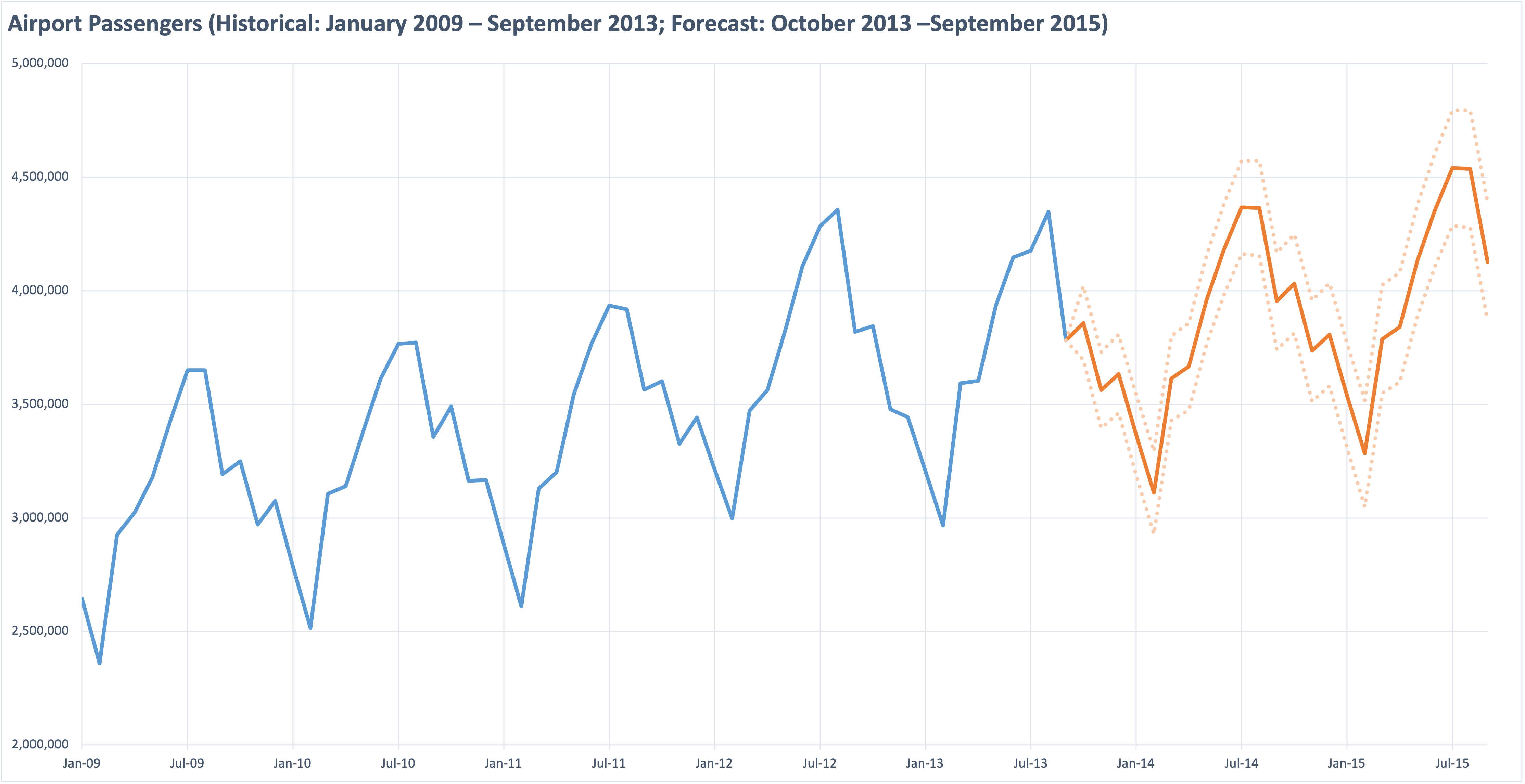
Improved Excel line chart of the same airport passenger data, with a clearer header reading "Airport Passengers (Historical: January 2009 – September 2013; Forecast: October 2013 – September 2015)." The x-axis now displays labels every six months (Jan-09, Jul-09, Jan-10, and so on), making the dates legible. The y-axis range is narrowed to roughly 2 million to 5 million, accentuating the seasonal pattern. The forecast period is shown in orange with transparent dotted confidence bounds on either side.

The changes from the original:

  • X-axis interval set to 6 months. This eliminates the dense text from the previous chart and, as a bonus, naturally captures the seasonality of the data (lows in February, highs in July or August).
  • Vertical gridlines added at those same six-month intervals to guide the eye between key dates.
  • Y-axis range narrowed. Because this is a line chart rather than a bar chart, there is no need to start at zero. Choosing a range that captures the actual data accentuates the seasonal pattern.
  • Title doing double duty as a y-axis label, with enough information that the legend becomes unnecessary.
  • Simpler color palette. Two colors instead of four, with the confidence bounds shown as transparent dashed lines. If the main message were the uncertainty of the forecast, those elements would be emphasized; here, the message is the modest growth of the forecasted values.

A Grammar of Graphics alternative

This example was developed using ggplot2 and the fpp3 R package bundle, but it could just as easily have been built in Python using Plotnine and either statsmodels or statsforecast for the modeling.

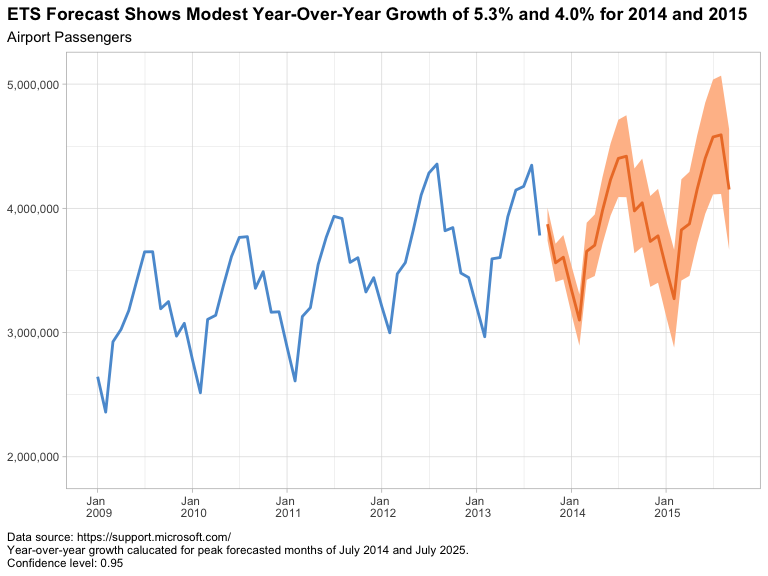
ggplot2 version of the same airport passenger chart, with a title in bold reading "ETS Forecast Shows Modest Year-Over-Year Growth of 5.3% and 4.0% for 2014 and 2015" and a subtitle reading "Airport Passengers." The x-axis displays annual labels (Jan 2009 through Jan 2015) with horizontal text. The historical data is shown as a blue line; the forecast period is shown as an orange line with a translucent orange band representing the 95% confidence interval. Source attribution and confidence level are noted in small text at the bottom left.

In this version I kept several of the default values—the annual x-axis labels, the default font sizes, and the shaded confidence intervals. If I were preparing this for a live presentation, I would adjust the fonts to ensure legibility for the audience.

The first task is making sure dates are handled as a proper time series. When reading the Excel file, the date column is correctly identified as the POSIXct datetime class; however, for time series analysis we want a structure where the intervals are guaranteed to be equal. In R, that means converting the data frame to a tsibble using the yearmonth() function. (Python’s pandas library took a different approach. Wes McKinney designed it from the start around labeled-axis data structures with integrated time series functionality, which is part of why it became the default tool for this kind of work.)

For both ggplot2 and Plotnine, we have complete control over major and minor breaks and gridlines on each axis. That control lets us choose a natural six-month or annual interval along the x-axis that guides the eye along the seasonal trend without introducing clutter.

In grammar of graphics tools, the title is built into the syntax rather than added as an afterthought. That makes it natural to write a title that conveys the message I want the audience to remember: modest year-over-year growth of 5.3% and 4.0% for 2014 and 2015, measured at the July peaks. The chart’s job is to support that claim; the title states it directly.

One additional technique worth exploring on charts like this is the use of alternating shaded bands—quarterly, yearly, or monthly depending on the data—to provide visual anchors and rhythm without adding more gridlines or labels. I didn’t apply it here, but for longer time series it can give the eye natural resting points that further reduce cognitive load.

My Conclusion

Time series charts go wrong when defaults take over: every date displayed, rotated labels, a y-axis pinned to zero, a title that names the chart instead of explaining it, and a legend doing work the chart could do on its own. None of these defaults are wrong in isolation, but together they produce the cluttered output we started with.

Whether the work is done in Excel, ggplot2, or Plotnine, the principles are the same—show fewer dates, narrow the y-axis when it helps, let the title carry the message, and minimize the legend. Excel can deliver a meaningful improvement with a few minutes of formatting. A grammar of graphics tool delivers the same improvements as a repeatable framework, which is the bigger win when the same chart needs to be produced again next quarter.


If you found this useful, you might also be interested in my earlier post on alternatives to dual y-axis charts, which works through a related set of design choices. I’m also posting related walkthroughs to my YouTube channel (@rayjameshoobler), and if you’re new to Python on Windows, my beginner’s guide Getting Started with Python on Windows 11 is available on Amazon.

Fixing a Dual Y-axis Chart from a Real Industry Report: Two Alternatives

The “Dual Y-Axis” Chart

Dual Y-axis charts are common in business reporting, and most of them do more harm than good. As Exhibit A, I present…

)

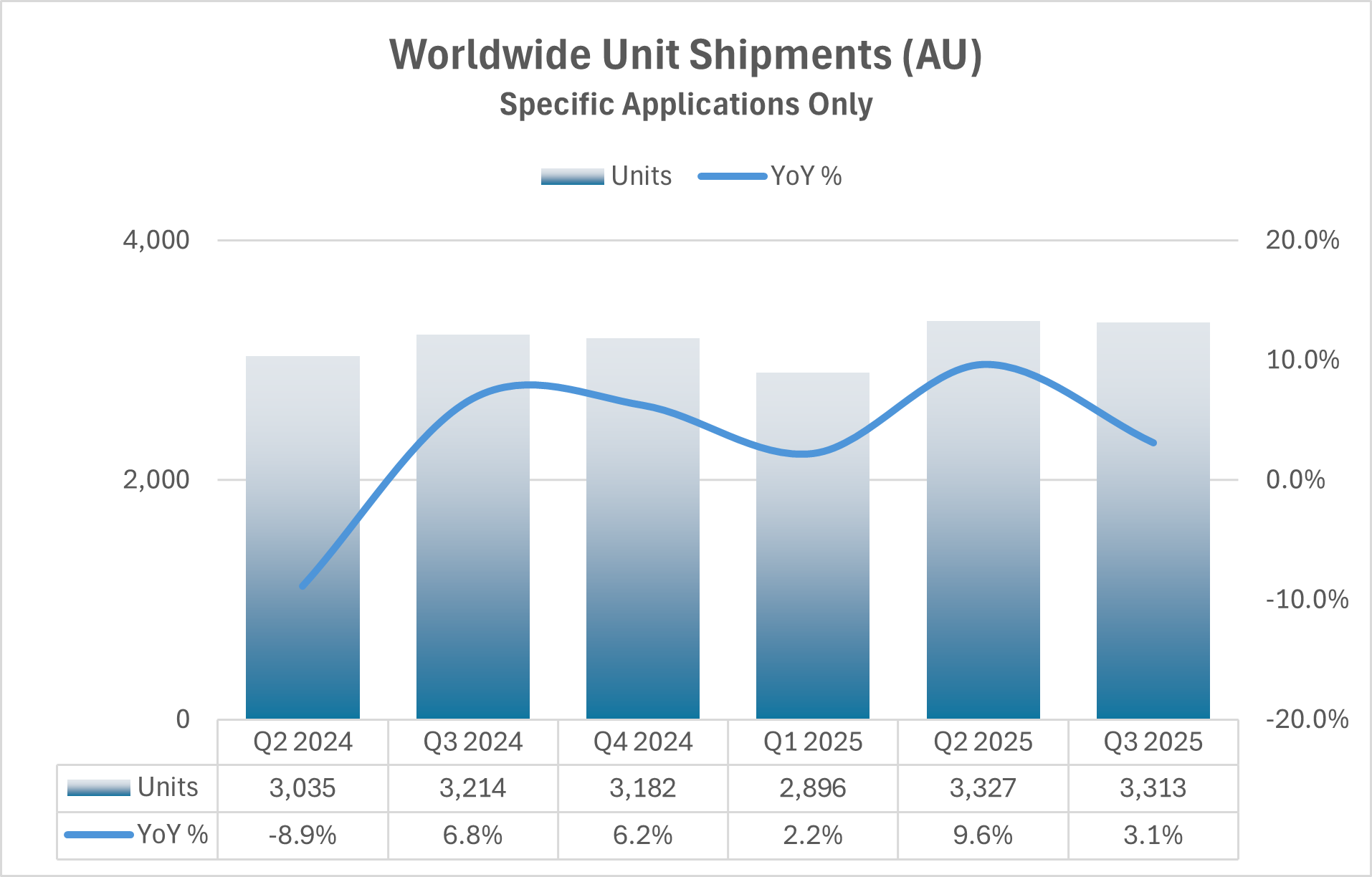
I’ve anonymized this chart to not offend the organization who published it, but this chart is based on a real industry report. Unfortunately, it’s not an uncommon choice and arises when anyone is challenged with presenting two pieces of (supposedly) related data on a single chart or slide. I have several issues with the chart:

  • The bar chart is correctly scaled to a lower value of zero but the large values make it difficult to see year to year changes which only occur within the upper 15% of the range.
  • The trend line has been “smoothed”. This obscures the data and implies movement between quarters that doesn’t exist.
  • The quarterly results are from Q2 of one year to Q3 of the next—six quarters. This seems like an odd choice and I would argue starting at Q1 and continuing through the latest quarter (or quarter of interest).
  • The year-over-year percent change implies past values are important, but the reader needs to back-out the prior year values if they want to make a direct comparison to the prior year. If we’re looking at changes over the past, in this case, three years, let’s show that data for each year.

To address these issues, I want to apply the following ideas to make the charts more accessible to the reader: don’t use two y-axes (make this a rule, not a guideline), trends should be captured with a line chart, the time frame of interest should be clearly stated in the title or subtitle (preferably the subtitle), the x-axis dates should be legible (the chart above does this well, but it’s often a challenge with time-series data), and finally, any chart created should stand on its own without needing a table—if a table is needed for reference, it should be a standalone item.

Can this data be presented on a single panel without two y-axes? Here are two ways.

Alternative A

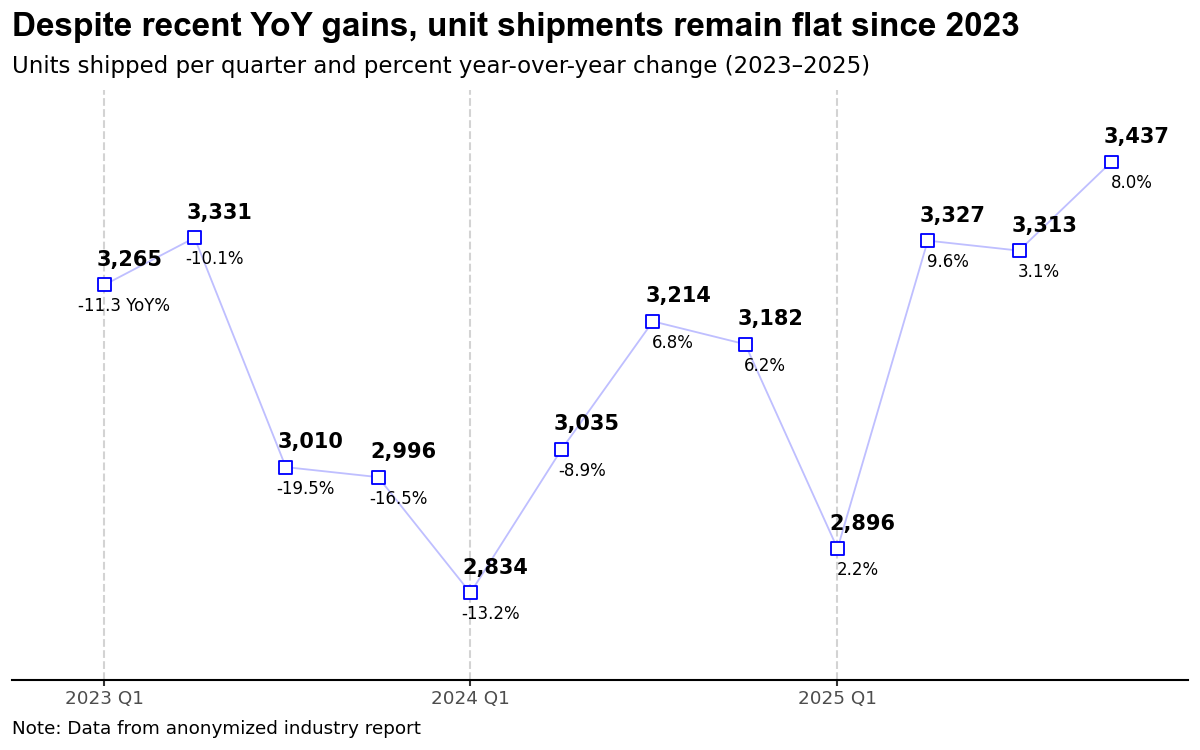
First, I decided that the period of interest is from 2023 to 2025 with the main message being captured in the title and the period clearly defined in the chart subtitle. Most importantly, I’ve changed the bar chart to a line chart as I want to focus on trends in the data; this immediately frees me to narrow the y-axis scale making the year-to-year variations visible. For this chart, I decided that I want the reader to have access to all the data, so each point is labeled with both the number of units (shipped) and the year-over-year percent change positioned above and below each marker, respectively. This chart pushes the upper limit of values placed on a chart—I see 10 to 12 labeled points being an upper limit. There’s a real argument that I’ve just moved the data table into the chart rather than eliminating it, but I’d rather have annotations the reader can immediately follow than a separate table they have to cross-reference. Units use a bold font to ensure a dominant position. Overall, I would argue this chart captures elements from the original while reducing the cognitive load required by the reader.

One thing I’d consider changing is my display of each period (quarters). While the major grid lines are sufficient for the calendar year, the minor grid lines are subtle and may not provide sufficient differentiation for some viewers. Adding a light shading to the panel with white grid lines would be an option worth exploring.

Alternative B

Since the dual y-axis chart is really two charts, it makes sense to create two charts. The question is then, how do I place these charts on the page to help the reader digest the content quickly. Not only do we have the obvious options of side-by-side versus stacked, but we also have to consider the relative size of each chart and how that conveys the message we want to deliver.

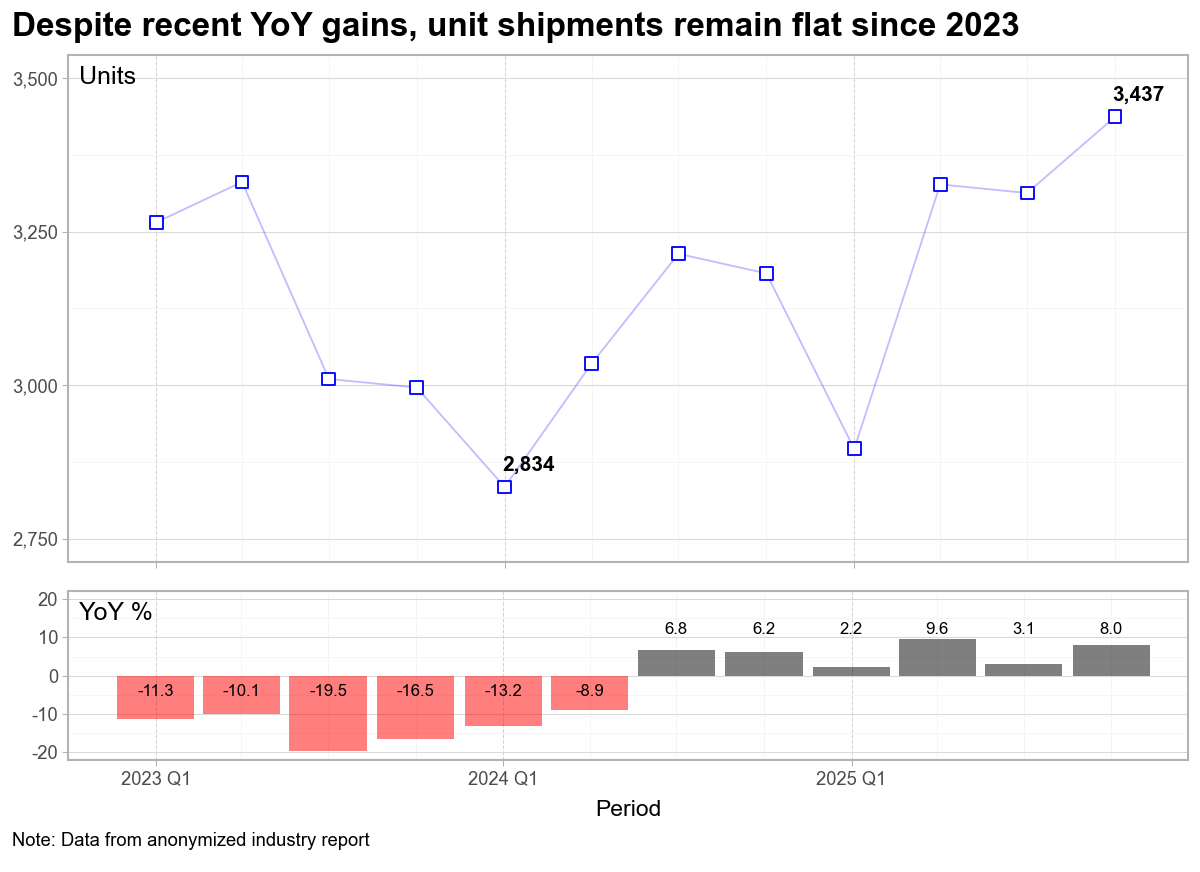
In the second example above, I’ve kept my basic line chart, but decided to only include the minimum and latest value in the chart. Because of this choice, I’ve reintroduced the y-axis which allows the reader to approximate the other values as needed. I could have used a second line chart for the year-over-year percent changes; however, the bar chart clearly differentiates the two sets of data. The ability to color negative values as red is a further visual cue that the period from 2023 to early 2024 was difficult, but that since Q3 2024, the trend has been positive.

I also made a choice to move the y-axis titles to a horizontal position at the top of the panel of each chart. No need for the reader to tilt their head as they scan down the page. I’m aware of at least one plot tool that implements this style as the default placement.

That said, the size of each panel is used to convey importance, with the top chart (Units) dominating the bottom chart (YoY%).

Again, to aid the reader, I’d like to find a way to incorporate quarterly labels to the chart; however, my fear is that additional labels would add visual clutter. The quarterly bars do an adequate job providing this differentiation. If my plan is to use this chart in a presentation, I’d take time to ensure the fonts are appropriate—they may need to be increased.

My Conclusion

The visual clutter and cognitive load associated with dual y-axis charts can be avoided by using annotations on a single chart, or by creating two separate charts. This can be a time-consuming task in Excel; however, modern data analytic packages in python (Plotnine) or R (ggplot2) enable a repeatable framework that can streamline the process.

There are some great books available to help you create impactful charts and presentations. Three resources I continually reference are: Storytelling with Data by Cole Nussbaumer Knaflic which provides a solid framework to build effective data visualizations; Strategic Storytelling by Dave McKinsey, an overlooked gem demonstrating how top consulting firms incorporate visualizations into effective presentations; and Slide:ology by Nancy Duarte, which pushes the reader to think like a designer. While each has their own terminology, the goal is always the same, create visualizations (presentations) that inform the reader or audience.

Restarting My Blog

So why restart the blog? I miss having a place to organize, document, and share ideas and projects I’ve worked through. I’ve always bought into the idea that clear writing leads to clear thinking, and I know I need help with the latter.

My last post to this site was almost five years ago. I’m not sure why I stopped writing; however, at the time, I found myself in a position where I wasn’t sure if I could openly write what I wanted to write. (I was a state employee where individual expression was not embraced by the legislature.) After leaving that position and moving back into the corporate world, the incentives were to promote the “company line,” where the marketing team would provide content for employees to post on various platforms. I’m not a fan of this practice and decided I didn’t want to participate. So for five years, I stepped away from any form of blogging.

So what am I working on?

The most ambitious project is an Excel Add-in designed to help Business Development and Product Marketing Professionals systematically create explanatory visualizations. It’s not a generic chart builder, but an opinionated approach to common business graphs and charts that will hopefully eliminate the adjustments that too many professionals have to do the night (or early morning) before a quarterly meeting. This is still a work in progress, but I’m happy with where it’s at and I’ll be sharing updates here.

For people who want or need more flexibility, I’m developing in-person training sessions that introduce the grammar of graphics philosophy to working professionals. The sessions use Python—specifically Plotnine for visualizations and Polars for data wrangling. Over the last decade, I’ve had the opportunity to teach a graduate level course focused on applied statistics and analytics—leading learners with little (or no) programming experience to develop data and visualization skills that can be used in their professional endeavors. I’ll be posting related videos to a new YouTube channel (@rayjameshoobler).

The first three months away from the corporate world also gave me the opportunity to write a beginner’s guide—Getting Started with Python on Windows 11, available as an e-book on Amazon. This intentionally focused on how individuals can get started with Python on a Windows computer, which (in my observation) is still the most common OS in corporate America. The book walks beginners through setting up a new Python programming environment, the basics of Pandas and Polars for data wrangling, and creating visualizations using Python’s version of ggplot, Plotnine.

After my last corporate position was eliminated, I made the decision to not seek another full-time corporate or academic job. I’m far enough along in my career to take a personal/professional detour without causing significant disruption to my future self, and Semoctuo LLC is the home I’m building for these projects (Semoctuo.com). I’m also enjoying the challenge of implementing all the corporate functions that, as a regular employee, I used to take for granted (e.g., a business email address). I’m not sure if any of this will have financial viability or how it will play out, but with some clear thinking (preceded by some clear writing), I’m looking forward to the experience.

Tips To Help You When Starting Graduate School

It’s all about understanding their process.

A little over five years ago, I took a university administrator (staff) position after 15 years working at public and private companies. This change was somewhat of a homecoming as I had left a faculty position before moving into my industry work, but that is another story.

My goal here is to help guide folks on how to be successful in graduate school. 

First, I recognize there are significant differences between STEM fields and non-STEM fields—I come from the former. STEM fields include engineering, life sciences, physical sciences, and mathematics; non-STEM areas include social sciences and the humanities. A Council of Graduate Schools presentation from 2007 showed Ph.D. completion rates for STEM fields between 48% and 57% after seven years, with graduate students completing non-STEM degrees at 29% for Humanities and 41% for Social Sciences. At the 10-year mark, approximately 64% of engineering and life sciences graduate students completed the Ph.D.; social sciences and physical sciences topped out at 55%; the humanities failed to break 50%—showing only a 49% Ph.D. completion rate after ten years. (https://nanopdf.com/download/phd-completion-project-nsf-agep_pdf#)

A summary of the STEM master’s completion rates after four years was 66%. (https://cgsnet.org/masters-completion-project)

This article isn’t a research paper, so I didn’t dig further, but I would wager these numbers haven’t improved. 

How do you make sure you’re in the group that makes it?

Do the math.

If you’re applying for a Ph.D. program, you should expect a stipend and a tuition waiver, and you should look at this as a full-time job. For first-year graduate students in STEM fields, the department will likely tie compensation to being a teaching assistant (TA). In other words, you’re working for the money. Ideally, your faculty sponsor will be able to fund your work after the first year with a continued tuition waiver. Even if you’re getting paid and receive a tuition waiver, there is still the lost opportunity cost of what you could be earning by starting your career. That lost opportunity cost only gets more significant as the time to degree grows. Few people get rich after earning a Ph.D., and fewer doctoral graduates are finding tenure-line positions that offer lifetime job security. So do the math and figure out if the financial commitments and personal rewards are balanced.

If you’re applying to a master’s or professional program (e.g., health, MBA, professional science master’s), you will most likely be paying tuition—just like an undergraduate program. Unfortunately, unlike undergraduate studies, there are fewer opportunities for financial aid. One bright spot is that some employers have tuition reimbursement programs as part of their often underused benefits. I recognize that this assumes you are working in a closely related field, but this is an option to consider if the stars align in your favor.

Does it ever make sense to pay for a master’s or professional degree? If the total debt is manageable and the salary increases authentic, there should be a reasonable return on investment, but you have to do the math.

Before you apply, find out if you need a faculty sponsor (Ph.D. programs).

I’ll admit, this is not a requirement I’m familiar with as it’s not common in my field; however, I understand it is becoming more prevalent for smaller STEM programs and non-STEM areas. It’s frustrating to have a stellar GPA, excellent GRE scores, and solid letters of recommendation only to find out you weren’t accepted into a program because you didn’t nail down a sponsor during the application process. If the program you’re interested in doesn’t clearly state this requirement on their website, send an email to the program advisor and ask the question. 

Before you commit to a program, find out what their graduates are doing.

If you’re starting down the Ph.D. path, you probably have visions of being a professor. Unfortunately, the number of tenure-line faculty positions has collapsed as colleges and universities have decided to follow the cost-saving practice of hiring non-tenure line (aka, adjunct) faculty. Perhaps you’re doing better work than graduates from the nation’s top research institutions, but don’t ignore the inherent bias towards prestigious universities built into the system. Understanding what graduates do after completing their degree is a reasonable way to gauge your possible paths after graduation. Tracking graduate outcomes is hard, and most departments are just learning how to do this, so you might want to do this on your own. Successful faculty mentors will often advertise where their alumni go; however, some diligent work using LinkedIn might provide enough insights to guide your decision. 

Choose your advisor carefully.

If you’re looking at a traditional, research-based graduate program, you will spend most of that time working with a single faculty advisor. Yes, you may be required to rotate through several groups during your first year or “interview” multiple faculty as potential advisors, but this can be a ceremonial dance for many. Regardless, at the end of the courtship, it will come down to choosing one person to be your boss for the next four-plus years. If everything goes great, they will be a mentor and eventually a colleague, but at the beginning, they’re your boss. If you can’t identify who you’ll work for before starting a program, you should determine several faculty with whom you’d be willing to work—make sure you have options.

Focus on the process.

Each program should document the expected milestones for its program. Are placement exams required? How many courses do you need to complete, and by when? How are qualifying exams managed? When will you choose an advisor (if you weren’t required to do so before starting the program)? When will you form an advisory committee and present your dissertation proposal? What resources are available to students. And finally, when do you get to defend your work and graduate?

Be wary if a program hasn’t documented its process.

When you start your research, begin with the end in mind. 

(With apologies to the late Steven Covey)

When I started graduate school and joined a research group, several members were finishing—each was kind enough to give me a “comb” bound copy of their thesis. I didn’t realize this at the time, but this gave me a clear vision of what I needed to do to graduate. 

Go to the library (or open up a web browser) and download several recent dissertations from previous students in your group or department. Don’t look at how long it took the authors to complete the work—ask yourself, “can I complete a similar project in under five years?” Better yet, ask the question, “what do I need to complete a similar project in under five years?”

Don’t rely on luck.

I lucked into a good graduate experience; unfortunately, I’ve known people who struggled. Many don’t have a mentor with whom they can work as they contemplate graduate school, so I hope the thoughts above are helpful.
Planning for the long term

When do we make long term plans? 

As winter moves towards spring, my main job is to help potential students apply to graduate school—for programs that won’t start until Fall. And while most people assume a master’s degree takes two years to complete, that quickly goes to three when attending part-time. 

So, I’m asking people to envision their life three-plus years down the road when most of us can barely figure out what we’re going to do this week.

When I talk to people contemplating graduate school and the time commitments needed to be successful, I tell them it will go by quickly if they can fully commit to the program—planning for interruptions and distractions that will undoubtedly come. For working professionals, particularly in STEM disciplines, the goal of higher education usually isn’t learning for the sake of learning but to develop new knowledge and skills that will create value for themselves and their future employers. (Although I don’t think you can be successful without finding pleasure in learning itself.)

So what’s the plan?

Most people overestimate what they can do in one year and undersetimate what they can do in ten years.

Bill Gates

Opportunities to make change

I was listening to Freakonomics Radio podcast interview with Rahm Emanuel, who pointed out his somewhat famous quote is often shortened. Here is the full quote:

“You never want a serious crisis to go to waste. And what I mean by that is an opportunity to do things that you think you could not do before.”

Rahm Emanuel

I have taken this to heart in making changes at work, which means taking some professional risks. These are not substantial personal risks—they are trivial in the grand scheme of things, but meaningful to a small group of people where we can make work better. I am grateful that others have supported these changes.

We should not need a crisis to initiate change, and many managers have more authority to make changes than they think. We should want to make things better—always.

Applied Statistics

In some circles, “Statistics” has a bad reputation—primarily because most of us had limited training though the techniques are applied in numerous fields. The pharmaceutical industry uses statistical tests to determine if new drugs are effective (or harmful), manufacturing industries implement statistical process control to maintain ever higher quality standards, politicians have increased the use of polling to drive policy decisions, and the list could go on.

But in the current discussions on STEM education, I have yet to see an argument where statistics is elevated in the curriculum the way “computer programming” has been promoted.

Is it the way we teach math in general—heavy on theory and light on applications? For many, the applications are what makes the work interesting.

The $100,000 master’s degree?

The discussion on college debt seems to focus on extreme cases, and Six Figures in Debt for a Master’s Degree from Inside HigherEd pointed out several of these. While they did break down the averages by degree. It’s helpful to look at the type of institutions students attend and the programs of study. I’m personally interested in this analysis and started to explore the dataset and thought I’d share some of the first impressions.

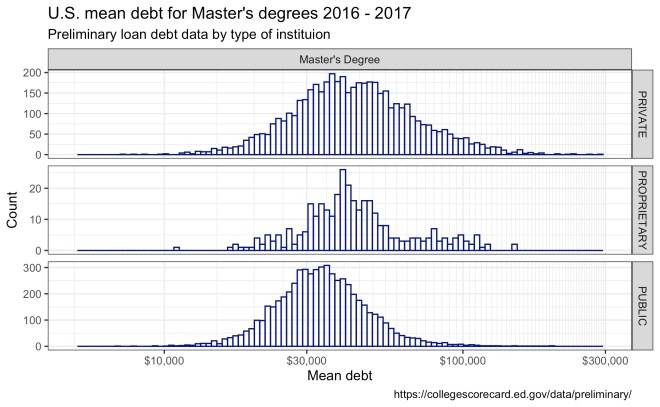
Looking at the data from 2016–2017, the mean debt is following a log-normal distribution, so some care will need to be taken in making comparisons between the groups. Including proprietary schools may not be useful given the low number of programs, but the spread is similar to private institutions.

mastersMeanDebt1617

For all master’s degrees with reported data, the mean debt values are $52k, $44k, and $39k for private, proprietary, and public institutions, respectively. Looking at various programs, the number with student debt over $100,000 is low.

I am particularly interested in STEM fields associated with the Professional Science Master’s movement; however, a quick survey shows that many schools’ data is suppressed to maintain privacy. As a first pass, CIP descriptions aligned with keywords from the PSM programs of study were used to narrow the scope of the analysis, including:

  • Agricultural Science, Food Science, Nutrition
  • Biotechnology
  • Computational Science, Analytics, Big Data, Statistics
  • Environmental Science, Ocean Science, Sustainability, GIS
  • Physical Sciences, Chemical Sciences

Business Administration, Management and Operations shows a wide range and is included for comparison. Dietetics and Clinical Nutrition Services also shows a wide range of mean debt, but the remaining programs have more modest ranges.

professional_masters

These are preliminary numbers but would indicate most students are managing their graduate education debt responsibly.

Exploring​ the “data” before EDA

Whiteboard space is at a premium in my office, but I’m always willing to erase a section to brainstorm a potential solution to new problems—afterall if we can visually create a “product” that provides insight, we can work backward and determine what data we need to produce that work.

I read Steven Covey’s book The 7-Habits of Highly Effective People well over a decade ago; however, “Begin with the End in Mind” has stuck with me as I’ve worked on various projects since that first reading. Currently, I’m working on several data-driven activities that remind me why this habit is so important.

Data Analysis (and Data Science) are hot topics, but too often folks want to jump right in and start crunching numbers—”Let’s run an X test on the Y samples and calculate the Z results.” It is easy to create large datasets that miss the mark and become wasted effort. While it may be hard, we need to get everyone to step back and ask the simple questions: “What problem are we trying to solve?” “What will this look like when we are ‘done’?”

Silicon Slopes Tech Summit 2019 (Day 2)

I am glad I can get out of the office and learn what companies are doing in Utah and Day 2 of the SSTS 2019 offered some more reminders of what is on the mind of tech leaders. In no particular order, here are several items I noted:

  • Companies are looking for individuals with domain knowledge who can reach across disciplines.
  • Culture eats strategy (i.e., it doesn’t matter how great your corporate strategy is if the culture of your company is terrible.)
  • Good companies promote a learning culture.
  • As a leader, get your hands dirty.
  • Make hiring decisions based on core competencies even if the person looks different than you.
  • How do customers increase revenue when they adopt your product or service?
  • Start by measuring something.